
Know which allocation you are looking at
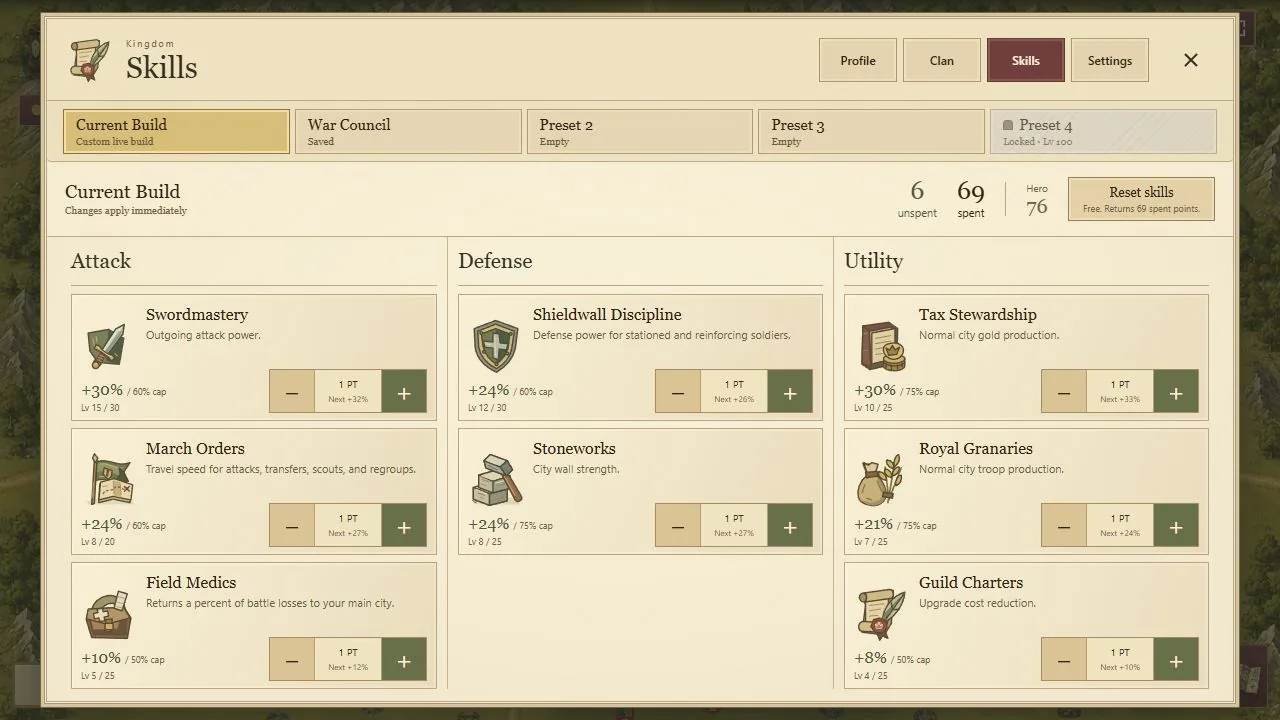
The Current Build is the allocation affecting your kingdom. An unlocked preset tab stores a separate plan, and editing that tab changes an isolated draft. Save records that draft; Apply is the action that changes the active build.
This separation lets you prepare a defensive plan while continuing to use your existing allocation. It also creates an easy mistake: closing the screen after Save and assuming the kingdom now has those bonuses. Check the active marker and the Current Build before an operation that depends on them.
Spend a limited point budget deliberately
Hero Level 1 starts with no points, and each later level awards one. As a fictional planning exercise, twenty points could maximize March Orders at 5% per point for a 100% skill-only march bonus. The same twenty points could instead fund ten Swordmastery points and ten Royal Granaries points, providing 20% attack and 30% troop production from those skills.
Neither allocation is a universal recommendation. The first emphasizes travel; the second trades that speed for attack and production. Compare them with the routes you use and the time you expect to hold productive cities. Keep wall strength, soldier defense and casualty recovery separate when considering other combinations.
The 3%-per-point skills reach exactly 100% with their thirty-fourth point. They do not continue to 102%. Use the cap when adding a complete plan.
Use names that explain the next decision
Private preset slots unlock at Hero Levels 25, 50, 75 and 100. Selecting, inspecting, saving, renaming and overwriting an unlocked tab are free. A name such as “border defense” is easier to evaluate later than a number that only made sense on the day you saved it.
Saved allocations do not automatically spend later-earned points. Applying an older preset can leave those new points unspent. Inspect all eight skills and the remaining point count after changing to a plan saved several Hero levels ago.
Compare the convenience with its Gold cost
Every confirmed Apply costs one hour of raw regular-city Gold production. The fee applies even if you select the active preset or an allocation identical to your current build. In a fictional kingdom with 15,000 raw Gold per hour, that is a 15,000-Gold Apply.
Reset Skills and individual point refunds are free. Manual changes clear the active preset marker without overwriting saved tabs. Use those controls with care: the point is to make the intended allocation, not to pay repeatedly while testing names or inspecting plans.
Apply before the effect is needed
An outgoing army records its attack preparation at launch. Applying an attack plan after it has departed does not improve that march. Defender skills are read live at arrival, so a defensive change can still matter before an incoming battle resolves.
After any change, verify the confirmed active allocation and the action’s displayed numbers. At a new season, Hero progress, skills and saved presets reset. Keep a written plan if useful, but expect to rebuild it with the points actually available in the new campaign.