
Cities and production
Develop Gold and troop production, compare your holdings and use +1, +5 or MAX upgrades from City List.
Build a productive kingdom →One city becomes a network of holdings, officers, armies and allies. Explore the systems that shape a Crownlands campaign, with a practical guide for each next step.
This directory describes the September 30 web game. Use the in-game panels for your current costs, eligibility and timers. Scenery and interface images show labelled demonstration captures. Planned mechanics are identified where relevant.
 I / Establish your foothold
Build production, choose a frontier and keep a home worth returning to.
Develop Gold and troop production, compare your holdings and use +1, +5 or MAX upgrades from City List.
Build a productive kingdom →Begin in the New Lands, choose eligible Main City locations and understand the neutral-city expansion limits.
Choose where to grow →Travel through a permanent 25-map Core and a frontier that expands as the shared realm needs room.
Explore the atlas →Read Welcome Back, check lost holdings and reconcile delayed actions before giving new orders.
Return to your kingdom → II / Choose your battle
Position matters. Find the difference between a strong army and a useful march.
Read route-specific travel time, leave a reserve and track attacks, transfers and returning armies.
Plan troop movements →Send one-troop scouts or review a nearby batch. Fresh intelligence lasts ten minutes and can change before your army arrives.
Read scout intelligence →Separate the wall and garrison phases, then inspect each participant, equipment effect, loss and recovered troop.
Understand the result →Check power-based assault limits, repaired-wall Shield eligibility, the offensive cooldown and exact-city retaliation.
Plan a siege →Locate approaching attacks and scouts, assembled rallies, reinforcements and your outstanding commitments.
Follow the kingdom ledger → III / Prepare for the campaign
Combine seasonal skills with equipment that follows you into the next realm.
Earn skill points, mix Attack, Defense and Utility effects and refund points when your plan changes.
Compare every skill →Unlock four slots, edit an isolated draft and pay the shown Gold cost only when applying a saved build.
Plan saved builds →Equip the War Captain, Master of Coin, Cavalry Master and Defensive Commander in their eight slots each.
Meet your officers →Combine matching pieces from Common through Legendary, with fixed Gold fees and five levels per rarity.
Read the crafting tables →Use six consumables for production, shielding, concealment, eligible travel and recall. Buying and activating are separate choices.
Choose the right item →Common Boxes contain three Common pieces. Uncommon Boxes contain one Uncommon and two Common pieces, all at Level 1.
Compare the chests → IV / Contest the map
A reward timer, a specialized bonus and a shared strongpoint demand different plans.
Hold a timed objective for raw-production rewards. Each category shares a daily allowance across all its locations.
Compare Camp payouts →Earn strategic items or an eligible neutral city. Plan for the hold, daily limits and the new city’s defense.
Plan a longer hold →Choose Gold, Training, Movement or Defense support and follow cumulative control in each holding’s ledger.
Compare strategic bonuses →Contest the central objective, follow its Reign Ledger and prepare for scheduled Legion attacks in the Citadel region.
Prepare the garrison → V / Build a shared plan
Coordinate people, individually owned soldiers and a Treasury with clear responsibilities.
Create or join a clan, manage permitted roles, publish its flag and use Clan Chat to coordinate.
Find your place in the clan →Support allies or assemble 2–20 rulers for a Stronghold or Citadel. Every participant must arrive and be Ready.
Assemble a rally →Three eligible members can attack a Tower. Each clan can own one, while contributed soldiers remain their owners’ troops.
Plan Tower conquest →Use the separate Clan Rewards panels. Donate toward Tower work and inspect current gifts and conquest goals.
Plan clan contributions →Unlock extra personal purchases and shorten new wall construction and paid repair times.
Develop your Tower →Completed levels and artwork remain. New upgrades are paused and these buildings grant no new combat bonuses.
Read the current building rules →Fund wall work and use the current paid ten-minute Tower Veil service. Stored Veil charges remain deferred.
Check Tower protection → VI / Make progress count
Follow the daily routine and the season’s standings without confusing their reset rules.
New cycles cover thirty login days, with weekly Common chests and a Day 30 Uncommon chest. Missed days pause progress.
Follow your reward cycle →Complete three daily missions, use one unfinished reroll, claim seasonal milestones and collect map resources.
Build a daily routine →Compare individual and clan strength, or enemy player casualties earned through the current season.
Read all three leaderboards →Final placements award stackable Gear Boxes and medals; top placements receive temporary decorations and titles.
Understand eligibility and claims →Explore finalized Kingdom, Clan and Glory standings on the public website. Current ranks remain in the game.
Read past standings →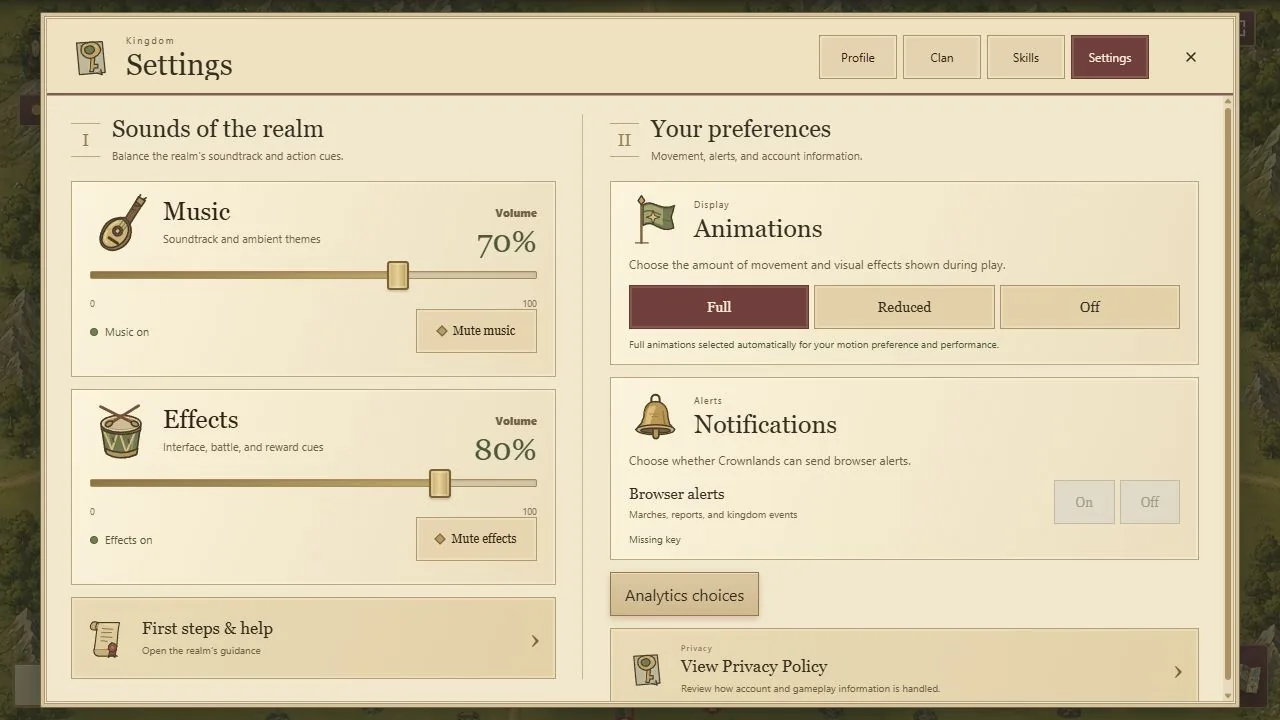 VII / Keep the realm within reach
Personalize your banner and make the game comfortable on desktop or landscape mobile.
Create a recognizable ruler banner and inspect public kingdom information without confusing it with a scout report.
Make your ruler recognizable →Coordinate in the relevant channel and translate individual messages when the action is available.
Communicate with your realm →Use the same Google account, keep one active session and install from playcrownlands.com on supported browsers.
Play across devices →Adjust music and effects, choose reduced motion, review browser alerts and open first-step help.
Make play comfortable →New rulers can begin with city production, nearby scouting and a reserve at home. Established kingdoms can compare officer upgrades, Camp allowances, clan construction and season standings. Each system has its own costs and timing: a higher kingdom score does not reveal a target’s garrison, and a city captured far away still needs troops to defend it.
The royal dispatches explain reviewed changes. The roadmap separates current systems from future possibilities. If a rule or screen is unclear, contact the team with the page and the detail that needs attention.