

Start here
- Open an officer in the Inner Castle.
- Inspect and equip an appropriate item.
- Check duplicate and gold requirements before upgrading.
Common mistake: Owning gear in the bag does not grant its equipped effect.
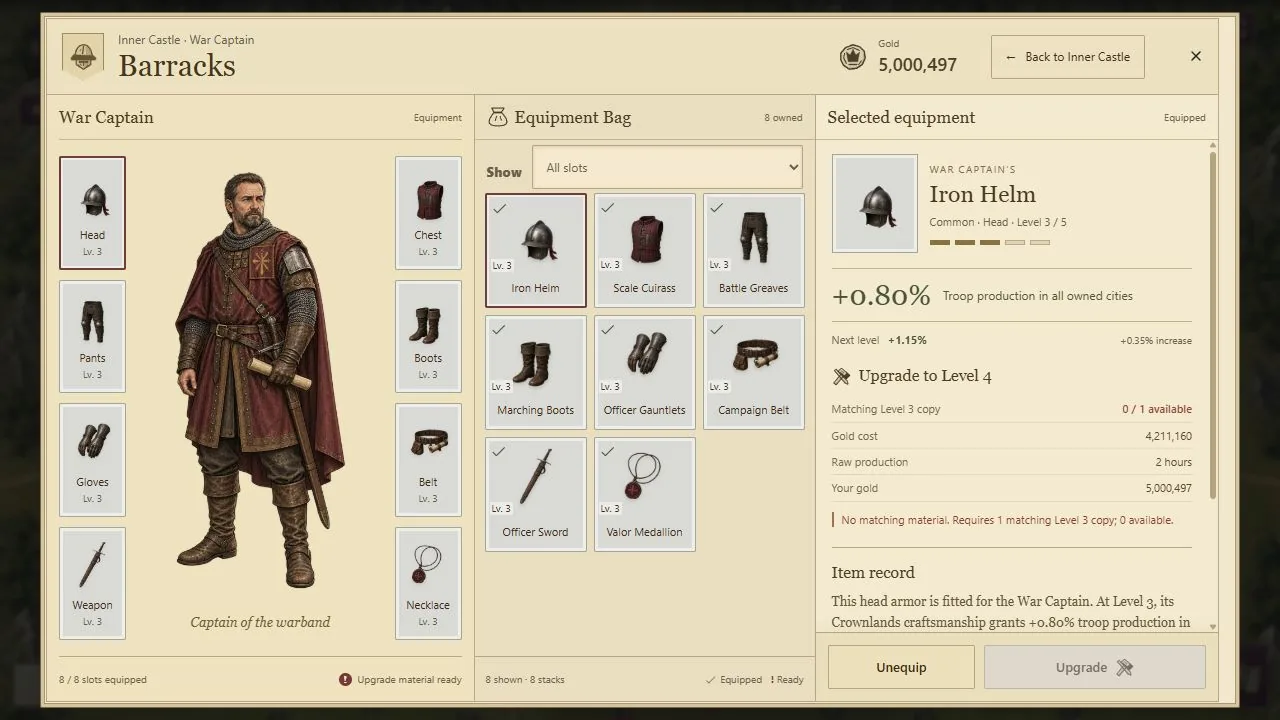
- 1Equipped slots show the pieces in this officer’s active loadout.
- 2The Equipment Bag lists pieces you can inspect and equip.
- 3Upgrade requirements show the matching copy and gold cost.
Select the image, then choose View full size to inspect details. Scroll or swipe inside the enlarged image.
Meet your officers in the Inner Castle
Open your Main City and choose Enter Inner Castle. The Barracks houses the War Captain, the Treasury the Master of Coin, the Royal Stables the Cavalry Master, and the Gatehouse the Defensive Commander. Each role has eight equipment slots and its own pieces.
The equipment window shows worn gear, the equipment bag, and the selected piece's effect. Inspect the role, slot, level, and bonus before equipping it. An item sitting in storage is not the same as an equipped bonus. The officer roles complement your skills rather than replacing them.
Equipment grows through five rarities
Common, Uncommon, Rare, Epic and Legendary each have five levels. Common bonuses remain 0.25%, 0.50%, 0.80%, 1.15% and 1.50%; higher rarities have effect-specific curves. Armor, weapons and necklaces improve different parts of your kingdom.
Two matching Level 5 pieces promote into Level 1 of the next rarity. Legendary Level 5 is the endpoint. Use the complete gear progression guide for fixed Gold fees, material requirements, officer roles and combined bonus limits.
Combine matching pieces
- Select the item you want to improve.
- Find a second piece of the same family, rarity and level.
- Check the fixed Gold fee and the next effect.
- Confirm the upgrade: both inputs become one higher-level piece.
An equipped target passes its slot to the result. Common upgrades cost 100,000, 170,000, 300,000 and 500,000 Gold for Levels 1→2 through 4→5. Promoting two Common Level 5 pieces to Uncommon Level 1 costs 850,000 Gold. These fees do not scale with your production. Every later step still requires a matching duplicate.
Open a Common Gear Box
A Common Gear Box reveals three server-selected Level 1 Common pieces. Sources include weekly Daily Login milestones, claiming all three Daily Missions, eligible Relic Camp rewards, Shops and season rewards. The separate Uncommon Gear Box gives one Level 1 Uncommon and two Level 1 Common pieces. Check the current offer in game instead of assuming that every reward screen gives a Box.
Inspect the reveal, then look in the appropriate officer's equipment bag. A duplicate can be useful upgrade material. Normal consumables and unopened Common Gear Boxes have different season-persistence rules; do not treat every object in the Bag as the same kind of inventory.
Six items, six different jobs
- War Drums: adds 30% of base troop production for 30 minutes. Use it to build reserves; using another extends the timer rather than making a single soldier hit harder.
- Royal Peace Shield: lasts 12 hours and protects owned regular cities only at 100% wall integrity. Damaged cities gain protection at full repair while you still own them and the Shield remains active. Activation turns back eligible outgoing rival attacks and incoming attacks on fully repaired cities. It excludes Strongholds, and attacking another player cancels it. Combat eligibility and activation cooldowns still apply.
- Royal Tax Decree: adds 50% of base gold production for 30 minutes. Time it around the economy you currently hold; additional uses extend the duration.
- Veil of Silence: blocks enemy scouting for five minutes. It does not protect a city from an attack.
- Swift March Order: speeds up one owned-city transfer or reinforcement to an owned Stronghold. Look for its option while preparing an eligible order.
- Recall Horn: cancels an eligible active march before it reaches its target. Use it when new information makes the destination unsafe; a completed arrival cannot be undone.
The Bag groups identical items and offers All, Boosts, War, Defense, and Utility categories. Select a stack to inspect its actual duration, target, and use controls. Do not use a valuable item simply to discover what it does.
Read the cost before buying or activating
Shop prices can scale with production or other configured values. Use the price displayed for your account at purchase time. Buying an item and activating it are different decisions; some actions belong in an order dialog rather than the general Bag.
A successful player-initiated PvP dispatch starts a 15-minute Peace Shield activation cooldown, and a later qualifying dispatch restarts it. The cooldown does not consume a Shield when activation is rejected. Check the combat timer card before buying protection for immediate use.
Optional rewarded ads depend on availability and confirmed completion. Closing an ad early or receiving no ad is not a reward. Normal gameplay remains available without watching.
Build around your next decision
Before a campaign, inspect your relevant equipment and skills, then read your own army's launch breakdown. Attack power is locked at dispatch, so later equipment changes do not rewrite an army already on the road. Defense can depend on conditions when an enemy arrives.
Preserve useful duplicates, equip pieces in their correct role, and keep consumables for situations where their effect matters. The current game panel is the final reference for availability and exact costs.