
Start here
- Choose source and destination.
- Read the actual travel time and leave a reserve.
- Track the order in Kingdom Activity.
Common mistake: A nearby-looking target can still require a long road route.
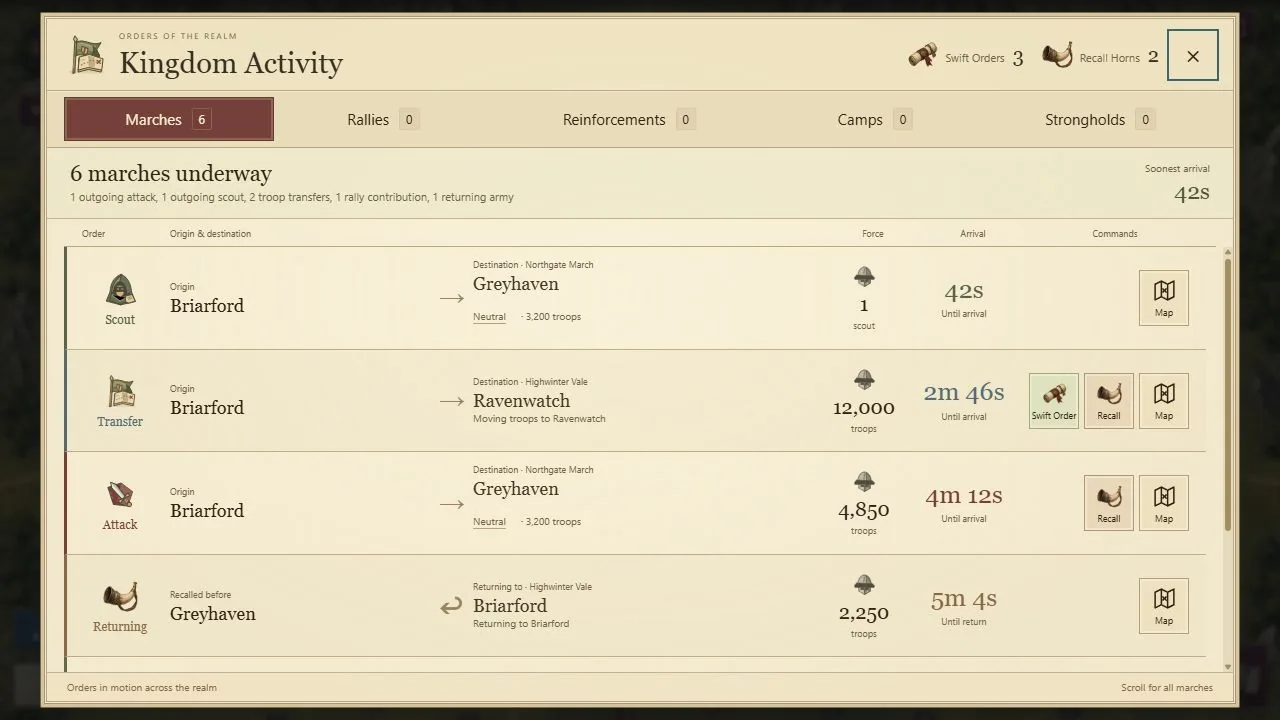
- 1Origin and destination identify each order.
- 2Arrival time is specific to this route.
- 3Only eligible orders expose recall or acceleration.
Select the image, then choose View full size to inspect details. Scroll or swipe inside the enlarged image.
Give each march a purpose
Crownlands armies travel in real time. Attacks seek a hostile holding; scouts gather intelligence; transfers reposition your own soldiers; reinforcements support eligible allied holdings. Returning forces are also real commitments, not instantly available troops.
Select the appropriate holding on the map and use its action controls. Check both endpoints. For an attack or transfer, adjust the troop slider and inspect the travel time and available bonuses. An army cannot defend its starting city while it is marching elsewhere.
Read the journey, not just the screen distance
Regional roads connect the current Core and New Lands. A cross-map journey follows the active network, so two icons that look close on the atlas can still require a longer valid route. The server checks the route and arrival time.
The travel panel shows Travel bonus and Travel time. Army size, order type, skills, equipped gear, applicable Strongholds, and a valid Swift March Order can affect the journey. Normal troop marches have no universal 30-minute maximum. Always use the actual time shown for your selected force.
Send intelligence ahead of the army
Select Scout on an eligible non-owned target. The game chooses the nearest reachable eligible origin; the scout uses one troop. Its arrival produces a report, rather than revealing everything instantly when you click.
Scout Nearby previews reachable nearby targets from an owned city. Review the highlighted targets and displayed cost before Send All. It is a charged batch, so do not assume that seeing the preview has already paid for or launched the scouts. A scout report remains a time-limited snapshot.
Transfer and regroup deliberately
Transfer moves troops to a friendly destination under the current ownership rules. Regroup gathers eligible nearby forces through a confirmed batch. Read its cost and destinations before confirming. These actions do not create soldiers or change their travel into instant movement.
For example, bring reserves toward an objective before your clan assembles its rally. Keep a defensible reserve at the sources. A shorter final journey is helpful only if you have not exposed every city behind it.
Support belongs to its contributor
Reinforced troops stay attributed to the ruler who sent them. A ruler can maintain two assignments with each clanmate, with one assignment per supported holding. Ordinary cities reserve at most five contributor slots; Strongholds and reward camps follow their own uncapped contributor policy.
Open Kingdom Activity to review marches and reinforcements. When ordinary reinforcements return, they use their recorded source if it remains owned; otherwise the server redirects them to their owner's current Main City. Ownership changes can therefore alter where you should look for returning soldiers.
Before pressing Send
- Check source, destination, and the soldiers left behind.
- Refresh intelligence for a risky attack.
- Read the actual journey and item choice.
- Check shields, relationship restrictions, and capacity messages.
- After launch, track the march in Kingdom Activity and inspect the eventual report.
Refreshing the page does not cancel a march. A Recall Horn has its own eligible-order rules; a recall is not a general promise that troops teleport home. If the order is rejected, refresh the affected holding and read the reason before trying again.
Read incoming threats and pending orders
Incoming Threats separates Attacks and Scouts, with arrival times and map links. Missing intelligence stays unknown. A pending departure means your order is awaiting confirmation; it is not proof that troops have reached the target or scouting has completed.
Accepted armies retain their committed arrival times. After waking a phone or reconnecting, allow the clock and order list to refresh before making another commitment. Use Kingdom Activity’s separate Marches, Rallies and Reinforcements views to tell travelling, assembling and stationed troops apart.
Put this system into practice
- Bring your reinforcements home without losing track — Follow troop ownership, reserved slots, return destinations and recall travel when a clan defense changes.